
Introducing Amazon MWAA Serverless | Amazon Web Services

AWS today announced Amazon Managed Workflows for Apache Airflow (MWAA) Serverless. This is a new deployment option for MWAA that eliminates the operational overhead of managing an Apache Airflow environment while optimizing costs through serverless scaling. This new offering addresses key challenges facing data engineers and DevOps teams in orchestrating workflows: operational scalability, cost optimization and access management.

With MWAA Serverless, you can focus on your workflow logic rather than monitoring provisioned capacity. Now you can submit your Airflow workflows to run on a schedule or on demand, paying only for the actual compute time used during the execution of each job. The service automatically handles all infrastructure scaling so your workflows run efficiently regardless of load.

In addition to simplified operations, MWAA Serverless introduces an updated security model for granular control through AWS Identity and Access Management (IAM). Each workflow can now have its own IAM permissions and run on a VPC of your choice, so you can implement precise security controls without creating separate Airflow environments. This approach significantly reduces security management overhead while strengthening your security posture.

In this post, we demonstrate how to use MWAA Serverless to build and deploy scalable workflow automation solutions. We’ll walk through hands-on examples of creating and deploying workflows, setting up observability through Amazon CloudWatch, and converting existing Apache Airflow Directed Acyclic Graphs (DAGs) to a serverless format. We’ll also explore best practices for managing serverless workflows and show you how to implement monitoring and logging.

How does MWAA Serverless work?

MWAA Serverless takes your workflow definitions and efficiently runs them in service-managed Airflow environments, automatically scaling resources based on workflow requirements. MWAA Serverless uses an Amazon Elastic Container Service (Amazon ECS) executor to run each individual job on its own ECS Fargate container, either in your VPC or a VPC managed by the service. These containers then communicate back to their assigned Airflow cluster using the Airflow 3 Task API.


Figure 1: Amazon MWAA architecture

MWAA Serverless uses declarative YAML configuration files based on the popular open source DAG Factory format to increase security through job isolation. You have two options for creating these workflow definitions:

This declarative approach provides two key advantages. First, because MWAA Serverless reads workflow definitions from YAML, it can determine job scheduling without running any workflow code. Second, it allows MWAA Serverless to grant execution permissions only when jobs are launched, rather than requiring broad permissions at the workflow level. The result is a more secure environment where task permissions are strictly defined and time-limited.

Service Aspects for MWAA Serverless

MWAA Serverless has the following limitations that you should consider when deciding between serverless and provisioned MWAA deployments:

  • Operator support
    • MWAA Serverless only supports carriers from the Amazon Provider Package.
    • To run your own code or scripts, you’ll need to use AWS services such as:
  • User interface
    • MWAA Serverless works without using the Airflow web interface.
    • We provide integration with Amazon CloudWatch and AWS CloudTrail for workflow monitoring and management.

Working with MWAA Serverless

To use MWAA Serverless, please complete the following prerequisites and steps.

Prerequisites

Before you begin, verify that you meet the following requirements:

  • Access and permissions
    • An AWS account
    • Installed and configured AWS Command Line Interface (AWS CLI) version 2.31.38 or later
    • Appropriate permissions to create and edit IAM roles and policies, including the following required IAM permissions:
      • airflow-serverless:CreateWorkflow
      • airflow-serverless:DeleteWorkflow
      • airflow-serverless:GetTaskInstance
      • airflow-serverless:GetWorkflowRun
      • airflow-serverless:ListTaskInstances
      • airflow-serverless:ListWorkflowRuns
      • airflow-serverless:ListWorkflows
      • airflow-serverless:StartWorkflowRun
      • airflow-serverless:UpdateWorkflow
      • iam:CreateRole
      • iam:DeleteRole
      • iam:DeleteRolePolicy
      • iam:GetRole
      • iam:PutRolePolicy
      • iam:UpdateAssumeRolePolicy
      • logs:CreateLogGroup
      • logs:CreateLogStream
      • logs:PutLogEvents
      • airflow:GetEnvironment
      • airflow:ListEnvironments
      • s3:DeleteObject
      • s3:GetObject
      • s3:ListBucket
      • s3:PutObject
      • s3:Sync
    • Access to Amazon Virtual Private Cloud (VPC) with Internet connection
  • Required AWS Services – In addition to MWAA Serverless, you will need access to the following AWS services:
    • Amazon MWAA to access your existing Airflow environments
    • Amazon CloudWatch to view logs
    • Amazon S3 for managing DAG and YAML files
    • AWS IAM for authorization control
  • Development environment
  • Additional requirements
    • Basic knowledge of Apache Airflow concepts
    • Understanding YAML syntax
    • Knowledge of AWS CLI commands

Note: We use sample values ​​in this post, which you will need to replace with your own:

  • Replace amzn-s3-demo-bucket with the name of your S3 group
  • Replace 111122223333 with your AWS account number
  • Replace us-east-2 with your AWS Region. MWAA Serverless is available in multiple AWS regions. See the list of available AWS services by region for current availability.

Create your first serverless workflow

Let’s start by defining a simple workflow that gets a list of S3 objects and writes that list to a file in the same bucket. Create a new file named simple_s3_test.yaml with the following content:

simples3test:
  dag_id: simples3test
  schedule: 0 0 * * *
  tasks:
    list_objects:
      operator: airflow.providers.amazon.aws.operators.s3.S3ListOperator
      bucket: 'amzn-s3-demo-bucket'
      prefix: ''
      retries: 0
    create_object_list:
      operator: airflow.providers.amazon.aws.operators.s3.S3CreateObjectOperator
      data: '{{ ti.xcom_pull(task_ids="list_objects", key="return_value") }}'
      s3_bucket: 'amzn-s3-demo-bucket'
      s3_key: 'filelist.txt'
      dependencies: (list_objects)

In order for this workflow to run, you must create a launch role that has dump and write permissions to the bucket above. The role must also be taken from MWAA Serverless. The following CLI commands create this role and associated policies:

aws iam create-role \
--role-name mwaa-serverless-access-role \
--assume-role-policy-document '{
    "Version": "2012-10-17",
    "Statement": (
      {
        "Effect": "Allow",
        "Principal": {
          "Service": (
            "airflow-serverless.amazonaws.com"
          )
        },
        "Action": "sts:AssumeRole"
      },
      {
        "Sid": "AllowAirflowServerlessAssumeRole",
        "Effect": "Allow",
        "Principal": {
          "Service": "airflow-serverless.amazonaws.com"
        },
        "Action": "sts:AssumeRole",
        "Condition": {
          "StringEquals": {
            "aws:SourceAccount": "${aws:PrincipalAccount}"
          },
          "ArnLike": {
            "aws:SourceArn": "arn:aws:*:*:${aws:PrincipalAccount}:workflow/*"
          }
        }
      }
    )
  }'

aws iam put-role-policy \
  --role-name mwaa-serverless-access-role \
  --policy-name mwaa-serverless-policy   \
  --policy-document '{
	"Version": "2012-10-17",
	"Statement": (
		{
			"Sid": "CloudWatchLogsAccess",
			"Effect": "Allow",
			"Action": (
				"logs:CreateLogGroup",
				"logs:CreateLogStream",
				"logs:PutLogEvents"
			),
			"Resource": "*"
		},
		{
			"Sid": "S3DataAccess",
			"Effect": "Allow",
			"Action": (
				"s3:ListBucket",
				"s3:GetObject",
				"s3:PutObject"
			),
			"Resource": (
				"arn:aws:s3:::amzn-s3-demo-bucket",
				"arn:aws:s3:::amzn-s3-demo-bucket/*"
			)
		}
	)
}'

You then copy your YAML DAG to the same S3 bucket and create your workflow based on Arn’s response from the function above.

aws s3 cp "simple_s3_test.yaml" \
s3://amzn-s3-demo-bucket/yaml/simple_s3_test.yaml

aws mwaa-serverless create-workflow \
--name simple_s3_test \
--definition-s3-location '{ "Bucket": "amzn-s3-demo-bucket", "ObjectKey": "yaml/simple_s3_test.yaml" }' \
--role-arn arn:aws:iam::111122223333:role/mwaa-serverless-access-role \
--region us-east-2

The output of the last statement returns a WorkflowARN value, which you then use to trigger the workflow:

aws mwaa-serverless start-workflow-run \
--workflow-arn arn:aws:airflow-serverless:us-east-2:111122223333:workflow/simple_s3_test-abc1234def \
--region us-east-2

The output returns a RunId a value that you then use to check the running status of the workflow you just executed.

aws mwaa-serverless get-workflow-run \
--workflow-arn arn:aws:airflow-serverless:us-east-2:111122223333:workflow/simple_s3_test-abc1234def \
--run-id ABC123456789def \
--region us-east-2

If you need to make a change to your YAML, you can copy it back to S3 and run it update-workflow command.

aws s3 cp "simple_s3_test.yaml" \
s3://amzn-s3-demo-bucket/yaml/simple_s3_test.yaml

aws mwaa-serverless update-workflow \
--workflow-arn arn:aws:airflow-serverless:us-east-2:111122223333:workflow/simple_s3_test-abc1234def \
--definition-s3-location '{ "Bucket": "amzn-s3-demo-bucket", "ObjectKey": "yaml/simple_s3_test.yaml" }' \
--role-arn arn:aws:iam::111122223333:role/mwaa-serverless-access-role \
--region us-east-2

Converting Python DAGs to YAML format

AWS has published a conversion tool that uses the open-source Airflow DAG processor to serialize Python DAGs into a YAML DAG factory format. To install, run the following:

pip3 install python-to-yaml-dag-converter-mwaa-serverless
dag-converter convert source_dag.py --output output_yaml_folder

For example, create the following DAG and name it create_s3_objects.py:

from datetime import datetime
from airflow import DAG
from airflow.models.param import Param
from airflow.providers.amazon.aws.operators.s3 import S3CreateObjectOperator

default_args = {
    'start_date': datetime(2024, 1, 1),
    'retries': 0,
}

dag = DAG(
    'create_s3_objects',
    default_args=default_args,
    description='Create multiple S3 objects in a loop',
    schedule=None
)

# Set number of files to create
LOOP_COUNT = 3
s3_bucket="md-workflows-mwaa-bucket"
s3_prefix = 'test-files'

# Create multiple S3 objects using loop
last_task=None
for i in range(1, LOOP_COUNT + 1):  
    create_object = S3CreateObjectOperator(
        task_id=f'create_object_{i}',
        s3_bucket=s3_bucket,
        s3_key=f'{s3_prefix}/{i}.txt',
        data="{{ ds_nodash }}-{{ ts_nodash | lower }}",
        replace=True,
        dag=dag
    )
    if last_task:
        last_task >> create_object
    last_task = create_object

Once you install python-to-yaml-dag-converter-mwaa-serverlessyou run:

dag-converter convert "/path_to/create_s3_objects.py" --output "/path_to/yaml/"

Where the output ends:

YAML validation successful, no errors found

YAML written to /path_to/yaml/create_s3_objects.yaml

And the resulting YAML will look like this:

create_s3_objects:
  dag_id: create_s3_objects
  params: {}
  default_args:
    start_date: '2024-01-01'
    retries: 0
  schedule: None
  tasks:
    create_object_1:
      operator: airflow.providers.amazon.aws.operators.s3.S3CreateObjectOperator
      aws_conn_id: aws_default
      data: '{{ ds_nodash }}-{{ ts_nodash | lower }}'
      encrypt: false
      outlets: ()
      params: {}
      priority_weight: 1
      replace: true
      retries: 0
      retry_delay: 300.0
      retry_exponential_backoff: false
      s3_bucket: md-workflows-mwaa-bucket
      s3_key: test-files/1.txt
      task_id: create_object_1
      trigger_rule: all_success
      wait_for_downstream: false
      dependencies: ()
    create_object_2:
      operator: airflow.providers.amazon.aws.operators.s3.S3CreateObjectOperator
      aws_conn_id: aws_default
      data: '{{ ds_nodash }}-{{ ts_nodash | lower }}'
      encrypt: false
      outlets: ()
      params: {}
      priority_weight: 1
      replace: true
      retries: 0
      retry_delay: 300.0
      retry_exponential_backoff: false
      s3_bucket: md-workflows-mwaa-bucket
      s3_key: test-files/2.txt
      task_id: create_object_2
      trigger_rule: all_success
      wait_for_downstream: false
      dependencies: (create_object_1)
    create_object_3:
      operator: airflow.providers.amazon.aws.operators.s3.S3CreateObjectOperator
      aws_conn_id: aws_default
      data: '{{ ds_nodash }}-{{ ts_nodash | lower }}'
      encrypt: false
      outlets: ()
      params: {}
      priority_weight: 1
      replace: true
      retries: 0
      retry_delay: 300.0
      retry_exponential_backoff: false
      s3_bucket: md-workflows-mwaa-bucket
      s3_key: test-files/3.txt
      task_id: create_object_3
      trigger_rule: all_success
      wait_for_downstream: false
      dependencies: (create_object_2)
  catchup: false
  description: Create multiple S3 objects in a loop
  max_active_runs: 16
  max_active_tasks: 16
  max_consecutive_failed_dag_runs: 0

Note that since the YAML conversion is done after the DAG is parsed, a loop is first run to create the tasks, and the resulting static list of tasks is written to a YAML document with their dependencies.

DAG migration of MWAA environment to MWAA Serverless

You can leverage MWAA’s provisioned environment to develop and test your workflows, then move them to serverless to run efficiently at scale. Additionally, if your MWAA environment uses compatible MWAA Serverless operators, you can convert all DAG environments at once. The first step is to enable MWAA Serverless to assume the role of MWAA Execution through a trust relationship. This is a one-time operation for each MWAA Execution role and can be done manually in the IAM console or using the AWS CLI command as follows:

MWAA_ENVIRONMENT_NAME="MyAirflowEnvironment"
MWAA_REGION=us-east-2

MWAA_EXECUTION_ROLE_ARN=$(aws mwaa get-environment --region $MWAA_REGION --name $MWAA_ENVIRONMENT_NAME --query 'Environment.ExecutionRoleArn' --output text )
MWAA_EXECUTION_ROLE_NAME=$(echo $MWAA_EXECUTION_ROLE_ARN | xargs basename) 
MWAA_EXECUTION_ROLE_POLICY=$(aws iam get-role --role-name $MWAA_EXECUTION_ROLE_NAME --query 'Role.AssumeRolePolicyDocument' --output json | jq '.Statement(0).Principal.Service += ("airflow-serverless.amazonaws.com") | .Statement(0).Principal.Service |= unique | .Statement += ({"Sid": "AllowAirflowServerlessAssumeRole", "Effect": "Allow", "Principal": {"Service": "airflow-serverless.amazonaws.com"}, "Action": "sts:AssumeRole", "Condition": {"StringEquals": {"aws:SourceAccount": "${aws:PrincipalAccount}"}, "ArnLike": {"aws:SourceArn": "arn:aws:*:*:${aws:PrincipalAccount}:workflow/*"}}})')

aws iam update-assume-role-policy --role-name $MWAA_EXECUTION_ROLE_NAME --policy-document "$MWAA_EXECUTION_ROLE_POLICY"

We can now loop through each successfully converted DAG and create serverless workflows for each.

S3_BUCKET=$(aws mwaa get-environment --name $MWAA_ENVIRONMENT_NAME --query 'Environment.SourceBucketArn' --output text --region us-east-2 | cut -d':' -f6)

for file in /tmp/yaml/*.yaml; do MWAA_WORKFLOW_NAME=$(basename "$file" .yaml); \
      aws s3 cp "$file" s3://$S3_BUCKET/yaml/$MWAA_WORKFLOW_NAME.yaml --region us-east-2; \
      aws mwaa-serverless create-workflow --name $MWAA_WORKFLOW_NAME \
      --definition-s3-location "{\"Bucket\": \"$S3_BUCKET\", \"ObjectKey\": \"yaml/$MWAA_WORKFLOW_NAME.yaml\"}" --role-arn $MWAA_EXECUTION_ROLE_ARN  \
      --region us-east-2  
      done

To see a list of created workflows, run:

aws mwaa-serverless list-workflows --region us-east-2

Monitoring and observability

The execution status of the MWAA Serverless workflow is returned via GetWorkflowRun function. The results from this will return the details for that particular run. If there are errors in the workflow definition, they are returned under RunDetail in ErrorMessage field as in the following example:

{
  "WorkflowVersion": "7bcd36ce4d42f5cf23bfee67a0f816c6",
  "RunId": "d58cxqdClpTVjeN",
  "RunType": "SCHEDULE",
  "RunDetail": {
    "ModifiedAt": "2025-11-03T08:02:47.625851+00:00",
    "ErrorMessage": "expected token ',', got 'create_test_table'",
    "TaskInstances": (),
    "RunState": "FAILED"
  }
}

Workflows that are correctly defined but whose tasks fail will roll back "ErrorMessage": "Workflow execution failed":

{
  "WorkflowVersion": "0ad517eb5e33deca45a2514c0569079d",
  "RunId": "ABC123456789def",
  "RunType": "SCHEDULE",
  "RunDetail": {
    "StartedOn": "2025-11-03T13:12:09.904466+00:00",
    "CompletedOn": "2025-11-03T13:13:57.620605+00:00",
    "ModifiedAt": "2025-11-03T13:16:08.888182+00:00",
    "Duration": 107,
    "ErrorMessage": "Workflow execution failed",
    "TaskInstances": (
      "ex_5496697b-900d-4008-8d6f-5e43767d6e36_create_bucket_1"
    ),
    "RunState": "FAILED"
  },
}

MWAA Serverless job logs are stored in the CloudWatch log group /aws/mwaa-serverless// (where / is the same string as the unique workflow ID in the workflow ARN). For specific job log streams, you will need to list the jobs for the workflow to run and then get information about each job. You can combine these operations into a single CLI command.

aws mwaa-serverless list-task-instances \
  --workflow-arn arn:aws:airflow-serverless:us-east-2:111122223333:workflow/simple_s3_test-abc1234def \
  --run-id ABC123456789def \
  --region us-east-2 \
  --query 'TaskInstances().TaskInstanceId' \
  --output text | xargs -n 1 -I {} aws mwaa-serverless get-task-instance \
  --workflow-arn arn:aws:airflow-serverless:us-east-2:111122223333:workflow/simple_s3_test-abc1234def \
  --run-id ABC123456789def \
  --task-instance-id {} \
  --region us-east-2 \
  --query '{Status: Status, StartedAt: StartedAt, LogStream: LogStream}'

Which would result in the following:

{
    "Status": "SUCCESS",
    "StartedAt": "2025-10-28T21:21:31.753447+00:00",
    "LogStream": "//aws/mwaa-serverless/simple_s3_test_3-abc1234def//workflow_id=simple_s3_test-abc1234def/run_id=ABC123456789def/task_id=list_objects/attempt=1.log"
}
{
    "Status": "FAILED",
    "StartedAt": "2025-10-28T21:23:13.446256+00:00",
    "LogStream": "//aws/mwaa-serverless/simple_s3_test_3-abc1234def//workflow_id=simple_s3_test-abc1234def/run_id=ABC123456789def/task_id=create_object_list/attempt=1.log"
}

At this point you would use CloudWatch LogStream output for debugging your workflow.

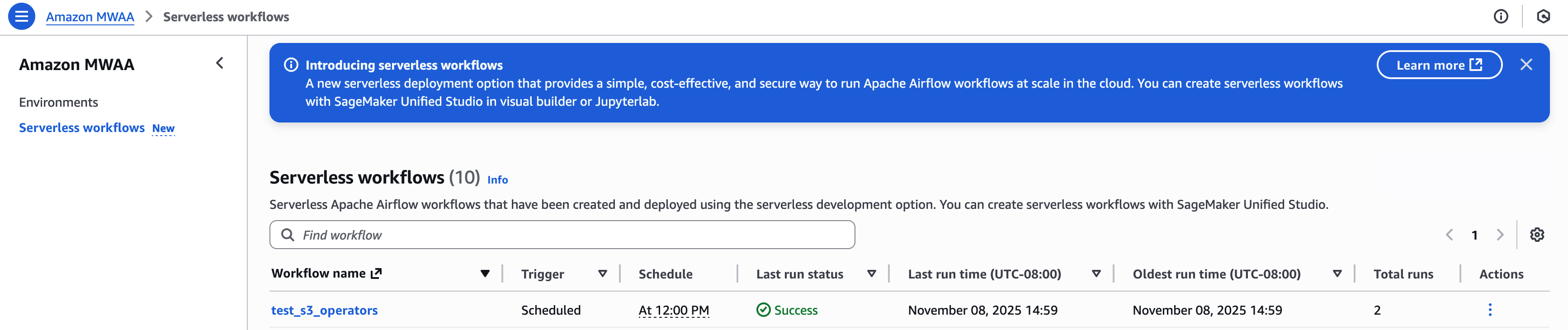
You can view and manage your workflows in the Amazon MWAA Serverless console:
For an example that creates detailed metrics and a monitoring dashboard using AWS Lambda, Amazon CloudWatch, Amazon DynamoDB, and Amazon EventBridge, see the example in this GitHub repository.

Clean up the resources

To avoid ongoing charges, clean up all resources created during this course by following these steps:

  1. Delete MWAA Serverless Workflows – Run this AWS CLI command to delete all workflows:
    aws mwaa-serverless list-workflows --query 'Workflows(*).WorkflowArn' --output text | while read -r workflow; do aws mwaa-serverless delete-workflow --workflow-arn $workflow done

  2. Remove the IAM roles and policies created for this course:
    aws iam delete-role-policy --role-name mwaa-serverless-access-role --policy-name mwaa-serverless-policy

  3. Remove the YAML workflow definitions from your S3 bucket:
    aws s3 rm s3://amzn-s3-demo-bucket/yaml/ --recursive

After completing these steps, verify in the AWS Management Console that all resources were removed correctly. Note that CloudWatch logs are kept by default and may need to be deleted separately if you want to delete all traces after running a workflow.

If you encounter any errors during the cleanup, verify that you have the necessary permissions and resources before attempting to remove them. Some resources may have dependencies that require them to be removed in a certain order.

Conclusion

In this post, we explored Amazon MWAA Serverless, a new deployment option that simplifies Apache Airflow workflow management. We’ve shown how to create workflows using YAML definitions, convert existing Python DAGs to a serverless format, and monitor your workflows.

MWAA Serverless offers several key benefits:

  • No provisioning overhead
  • Pay-as-you-go pricing model
  • Auto-scaling based on workflow requirements
  • Improved security with granular IAM permissions
  • Simplified definition of workflows using YAML

For more information about MWAA Serverless, see the documentation.


About the authors

John Jackson

John Jackson

John has over 25 years of software experience as a developer, system architect and product manager in both startups and large corporations, and is the AWS Principal Product Manager responsible for Amazon MWAA.

Leave a Comment